







Most service businesses don’t have an automation problem. They have a clarity problem. Before you invest in another workflow automation tool, you need to know which of your workflows are actually costing you money. This guide covers what the tools do well, what they can’t fix, and the three questions every service business owner should answer before spending a dollar on automation software.
🎧 Prefer to Listen? I turned this article into an audio deep-dive perfect for your commute.
The Business That Keeps Getting Heavier
You didn’t buy the software all at once. It happened slowly. First it was the scheduling tool. Then the CRM. Then the project management platform someone recommended at a conference. Then the invoicing system that “integrates with everything.” Then the AI assistant that was supposed to save you four hours a week.
At some point, you stopped counting the subscriptions. You started counting the months.
Right now, there are tools in your tech stack that you pay for every single month that nobody on your team uses consistently. Maybe you log in to check something. Maybe one of your employees uses it, kind of. Maybe you keep it because canceling feels like admitting it didn’t work. But the charge hits your card and you keep moving, because there is always something more pressing than cleaning up the software pile.
This is not a story about being disorganized. This is a story about what happens when a business owner does exactly what they were told to do. Add the tools. Automate the workflows. Build systems. Get efficient. The advice was right. But somewhere between the sales demo and the monthly renewal, something got missed.
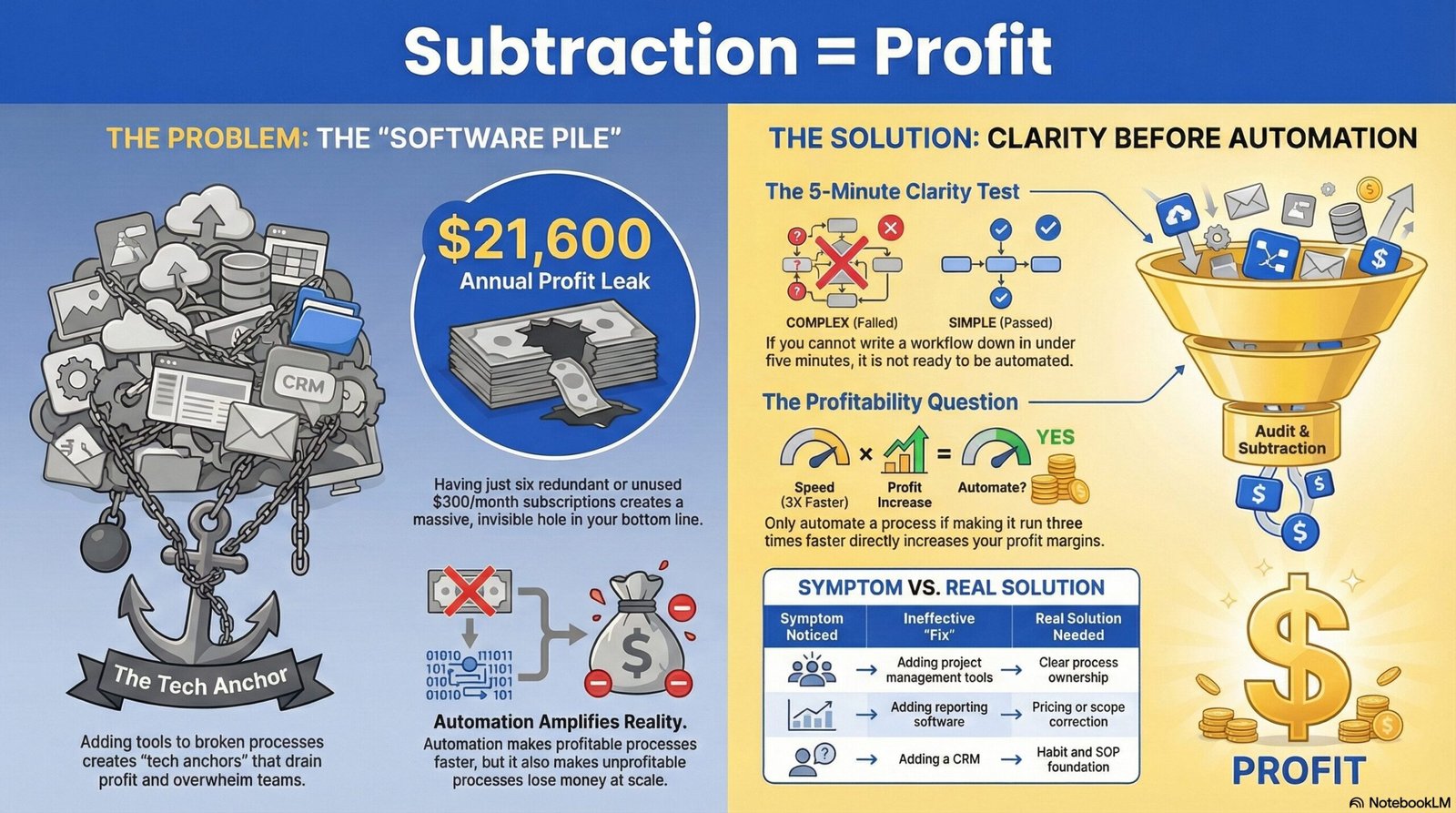
Here is what got missed: tools make your existing processes faster. That is it. That is all they do. If your processes are profitable and well-built, automation amplifies that. If your processes have hidden costs and inefficiencies baked in, automation amplifies that too. You cannot automate your way out of a broken system. You can only make the broken system run faster, and at scale.
All because you can, doesn’t mean you should.

The Contractor Who Kept Buying Better Tools
There is a contractor who had a pricing problem. His jobs were always running over budget. He was working more hours than he quoted. His team was great, his equipment was solid, but something kept bleeding money on every project.
His solution? Better project management software. A new scheduling platform. An automated invoicing tool. He bought all three within six months. His processes got faster. The money still bled.
The tools were not the problem. The pricing model was. He was underquoting by an average of 22% on every job, and he had been doing it so long that the mistake was invisible. No workflow automation tool in the world would have caught that. In fact, the faster he ran his business, the faster he lost money.
This is what shows up over and over in service businesses earning $250,000 to $5 million annually. The instinct when something feels inefficient is to add a tool. Sometimes that is the right call. More often, the real opportunity is to look at what is happening underneath the workflow before deciding whether to automate it.
Before you optimize a process, you have to confirm it is a process worth keeping.
The most dangerous thing about workflow automation tools is not that they are bad. It is that they are very good at doing the wrong things very quickly. A business with broken systems and no standard operating procedures will not be saved by automation. It will be buried by it, just more efficiently.

What Workflow Automation Tools Actually Do
According to Wikipedia, workflow automation is the use of technology to perform recurring tasks or processes in a business where manual effort can be replaced. That definition is accurate but incomplete. What it does not tell you is where automation creates real value versus where it creates the illusion of progress.
For service businesses, there are five types of automation worth understanding. The table below breaks them down in plain English, along with when each one actually earns its cost.
| Type of Automation | What It Does | Best For |
| Trigger-based | When X happens, do Y automatically | Follow-up messages, notifications, status updates |
| Scheduling | Sets tasks, reminders, and appointments | Recurring client touchpoints, team workflow |
| Data routing | Moves information between your software tools | Reducing manual data entry between systems |
| Client communication | Sends emails, texts, and updates automatically | Onboarding sequences, follow-through after jobs |
| Reporting | Pulls numbers into one place automatically | Weekly metrics, financial snapshots |
The most commonly used tools for service businesses in each of these categories include Zapier, Make (formerly Integromat), HubSpot, Monday.com, GoHighLevel, and Jobber. Each of these platforms works well for what it is designed to do. The question is never whether the tool works. The question is whether your business is ready for it to work.
But there is a tipping point where a helpful tech stack becomes a “tech anchor.” Once you have the right tools, the danger isn’t the software itself, it’s the silent accumulation of subscriptions you no longer need.
The Three Questions to Ask Before You Automate Anything
This is the section most “best automation tools” articles skip entirely. They go straight to the reviews. But the owners who get the most out of automation are the ones who do the diagnostic work first. According to research from McKinsey Global Institute, businesses that assess their process maturity before automating see significantly better outcomes than those who automate first and adjust later.
The three questions below are not complicated. But answering them honestly takes about twenty minutes and can save you thousands of dollars in the wrong software.
Question 1: Can you write down this workflow in under five minutes?
If you cannot describe the process clearly, step by step, in less than five minutes, you are not ready to automate it. Automation requires consistency. You cannot automate a process that changes every time someone runs it. If your workflow lives entirely in your head, or depends on judgment calls your team makes in the moment, adding a tool will not create consistency. It will just create expensive inconsistency.
Question 2: Does this process happen the same way every single time?
Some service businesses have workflows that are genuinely repeatable. Same steps, same sequence, same output. Those are candidates for automation. Others have workflows that feel repeatable but actually involve dozens of small decisions that shift based on the client, the job, or the day. Automating those creates friction, not efficiency.
Question 3: If this process ran three times faster, would your profit go up?
This is the most important question, and it is the one almost nobody asks. Speed without margin improvement is just busy. If a process is running fast and it is still unprofitable, making it faster means losing money faster. Before you automate any workflow, ask yourself: if my team executed this perfectly every single time, would I make more money? If the answer is no, the workflow itself needs to change before automation gets added.
| Symptom You Notice | What’s Usually Causing It | What Won’t Fix It |
| Team feels overwhelmed | No clear process ownership | Adding a project management tool |
| Clients fall through the cracks | Inconsistent follow-up habits | Adding a CRM before habits change |
| Revenue up but profit flat | Pricing or scope creep issue | Adding reporting software |
| Jobs running over budget | Underquoting or poor job costing | Adding scheduling software |
| Team using tools inconsistently | No SOP foundation in place | Adding more tools |
The Hidden Cost Nobody Talks About
There is a specific kind of profit leak that shows up in almost every service business, and it rarely appears on a profit and loss statement in a way that is obvious. It is called subscription creep, and it is exactly what it sounds like.
It starts with two or three tools that genuinely earn their cost. Then the team adds a few more. Then the old ones never get canceled because canceling takes time nobody has. Then a new hire brings in a tool they used at their last job. Then the owner buys something at a conference. Three years later, the business is paying for fourteen subscriptions, nine of which overlap in some way, and four of which nobody has opened in six months.
When working through a business overhead audit with a service business owner, software subscription creep is consistently one of the top three sources of recoverable profit. Not because any one subscription is expensive, but because the cumulative cost of tools that are not earning their keep adds up fast. A business paying $300 per month per tool across twelve subscriptions is spending $43,200 per year on software. If six of those tools are redundant or unused, that is $21,600 in annual profit leaking through a hole nobody noticed.
The fix is not to stop using tools. The fix is to treat your tech stack the way you treat your client list: keep what earns its value, release what doesn’t.
Who This Is NOT For
Not every service business is ready to invest in workflow automation, and saying that out loud matters. Most articles about “the best tools” won’t tell you this because they’re built around affiliate revenue. This one isn’t.
Here is who should wait before adding automation tools.
If you cannot describe your current workflow process clearly without referencing three different people on your team, you are not ready. If your service delivery changes significantly from client to client without a clear reason why, you are not ready. If your profit margins are below 15% and you haven’t identified why, you are not ready. As covered earlier, automation will make that problem worse, not better, because you will simply execute the unprofitable process more efficiently.
If any of those describe where you are right now, the right move before buying new tools is to do the diagnostic work first. Understand where your profit is leaking. Understand why busy businesses stay broke. Build the foundation. Then automate what you have built.
The fastest path to profit is almost never the next tool. It is almost always clarity about what is already happening in your business.
What Comes Before the Tool
There is a pattern in the service businesses that use automation well. They did not start with the tool. They started with the question: “What is this process supposed to accomplish, and is it accomplishing that right now?”
The businesses that use workflow automation tools most effectively are not the ones who bought the best software. They are the ones who understood their own business well enough to know exactly where a tool would help and where it would not. They had already done the work of finding out why their growth had stalled and what was actually driving their profit. The tools they chose were answers to specific questions, not solutions in search of a problem.
That shift, from “which tool should I add?” to “what does my business actually need?”, is the difference between a tech stack that earns its cost and one that quietly drains it.
According to the U.S. Small Business Administration, the businesses that successfully scale past $1 million in annual revenue share a common trait: they build systems that work independently of the owner before they build anything else. That is not an argument against technology. It is an argument for knowing what you are building before you automate it.
All because you can, doesn’t mean you should.
If this resonated and you are ready to look at what is actually happening in your business before your next software decision, let’s talk about whether working together makes sense.

About the Author
Ryan Herrst is a Platinum Elite Certified Profit Advisor and author of Profit Foundation. As the founder of Media Ace Advisors, he helps service business owners earning $250,000 to $5 million find hidden profit without spending another dollar on marketing or technology. His philosophy: all because you can, doesn’t mean you should.
I’m Ryan Herrst. I’m looking for industry leaders to help me validate the research for my next book. If you’re willing to spend 45 minutes sharing your industry perspective, no cost, no obligation, just data, let’s see if we can find your hidden six-figures together. Call or text me at 517-955-2154.
Frequently Asked Questions
What is the best workflow automation tool for a small service business?
There is no single best tool, but for most service businesses, Zapier or Make are the gold standards for connecting apps. However, the tool is secondary to your process. Before choosing, you must ensure your workflow is repeatable and profitable. Otherwise, you are automating a loss. For client communication specifically, GoHighLevel and Jobber are strong options purpose-built for service businesses.
How much does it cost to automate a service business?
Basic subscriptions for tools like Monday.com or Jobber range from $30 to $150 per month. But the real cost is subscription creep. Most businesses we review are overpaying by $500 or more monthly for redundant or unused tools. The highest return on investment consistently comes from subtracting software that is not earning its cost before adding anything new.
Can automation replace my office manager?
No. Automation is a force multiplier, not a replacement for human judgment. It should handle the repeatable and mundane, like appointment reminders or data entry, to free your manager for high-value work like client relationships and complex problem-solving. The human touch is a trust signal your business cannot afford to lose. Use technology to support your team, not replace what makes your business worth hiring.
2 Responses